How I Used Squad to Tackle 78 Azure CLI Issues in a Day

As an App Service PM, I like to try to contribute in ways other than the traditional product manager role. One of the easiest ways to do that is with the Azure CLI — it’s completely open source, and it’s a tool I use every day. As the PM, I’m the one who goes through and reviews all the feedback and issues customers file against our CLI commands. And over the past few years, we’ve built up a pretty significant backlog.
Whenever I’ve had some downtime, I’ve gone in and manually made fixes and shipped new features myself. Our dev teams are hard at work on new features, but that means bug fixes and feature requests from CLI issues don’t always get the attention they deserve. This was before AI was prevalent, so I was maybe getting one PR in every couple months. If any of you are CLI users for App Service and you’ve submitted an issue — we apologize for not giving those issues the attention they deserved. The CLI has always been a bit of a lower priority for us, especially with the number of hands we have at the moment.
So I decided to try something different. I’d heard about and used Squad, a multi-agent framework built by Brady Gaster, for small projects here and there, and thought: what if I could unleash a team of AI agents onto our backlog and actually make a dent?
Turns out, you can make more than a dent.
The Backlog
78 customer-reported GitHub issues spanning from 2018 to 2025. Some were legitimate bugs, some were feature requests, some were already fixed upstream, and some were just… stale. They touched everything from deployment and SSL to containers, auth, SSH, and more.
I’d been chipping away at these one at a time for years. At my old pace, clearing the backlog would have taken me the better part of a decade of “spare time.” Something had to change.
What is Squad?
Squad is a multi-agent AI framework that lets you define a team of specialized agents, each with their own charter and tools, and coordinate them to work on complex tasks. Think of it like having a small engineering team that lives in your terminal.
For this project, I set up six agents:
- Lead — Triage and board management. Owns the GitHub Project board, assigns priorities, routes issues to the right agent.
- Investigator — SDK and codebase research. Digs into the azure-cli source, reads the Python SDK docs, and figures out what’s actually going on.
- Reproducer — Live validation. Spins up real Azure resources and tries to reproduce the reported bugs.
- Analyst — Clustering and pattern recognition. Groups related issues together so we can batch fixes.
- Fixer — Code changes and PRs. Writes the actual fix, adds tests, opens the PR.
- Scribe — Logging and decision tracking. Documents every disposition, every decision, every comment.
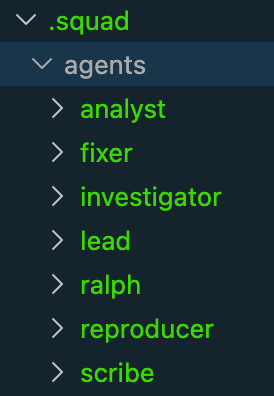 The
The .squad/agents/ folder — each agent gets its own charter defining its role, tools, and boundaries.
The key thing that makes this work: human-in-the-loop at every step. I approved every disposition before anything was posted to GitHub. Every comment that went onto an issue carried an AI attribution banner:
🤖 This comment was generated with AI assistance
Transparency matters. Customers deserve to know when they’re interacting with AI, and I wanted to make sure every recommendation was actually correct before it went out.
The Process
1. Setup & Planning
I started in plan mode in the GitHub Copilot CLI and talked through the entire approach. What steps would the agents need to take? What tools would they need access to? How would we handle live repros in my Azure subscription? How would we post comments on issues without being sketchy about it?
This planning phase was critical. You can’t just throw agents at a problem and hope for the best — you need to think through the workflow the same way you’d onboard a new team member.
2. Calibration — One Issue, End to End
Before unleashing Squad on 78 issues, we worked through a single issue together, from start to finish: triage → investigate → fix → PR → code review. This taught the Squad the full workflow — what the codebase looks like, how azdev works, how to run tests, how to structure a PR for the azure-cli repo.
This calibration step was essential. It set the standard for everything that followed and gave me confidence the agents understood the process.
3. Wave-Based Triage
Squad’s Analyst agent clustered the 78 issues by sub-label area, and we triaged them in 7 waves: deployment, SSL/certificates, containers, authentication, SSH, configuration, and miscellaneous. Each wave, the Lead would present recommendations — “this is a confirmed bug,” “this was fixed in SDK v3.2,” “this is a duplicate of #12345” — and I’d review every single one before the Scribe posted anything.
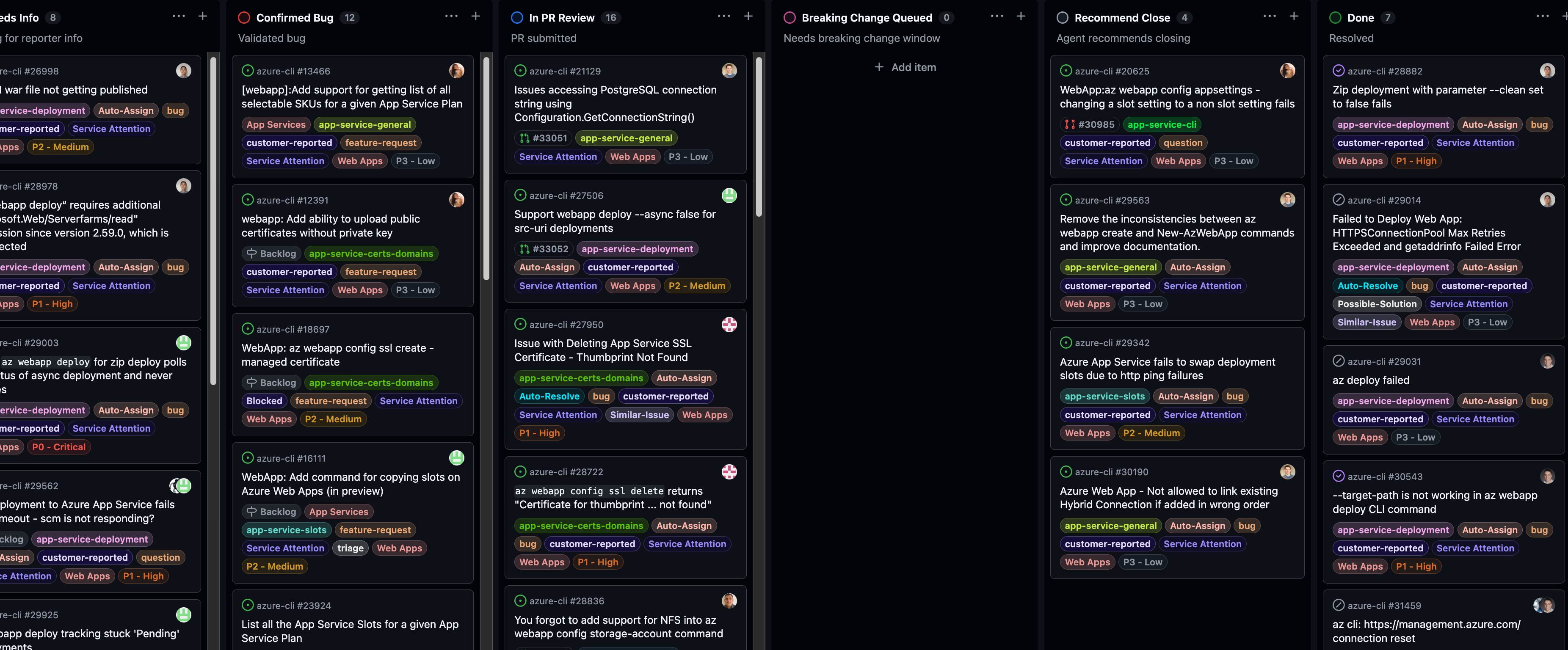 The GitHub Project board tracking every issue through triage, investigation, fix, and PR review.
This is where the human-in-the-loop pattern really proved its worth. Squad got most dispositions right, but I caught several that were wrong — issues it wanted to close that were actually still valid, or bugs it misdiagnosed. Without a human reviewing each one, those mistakes would have gone straight to customers. That’s not acceptable.
4. Parallel Fix Work with Git Worktrees
Here’s where things got fun. Multiple Fixer agents ran in parallel, each working in its own git worktree so they didn’t conflict with each other. One agent fixing SSL issues, another fixing container deployment bugs, another addressing auth problems — all at the same time.
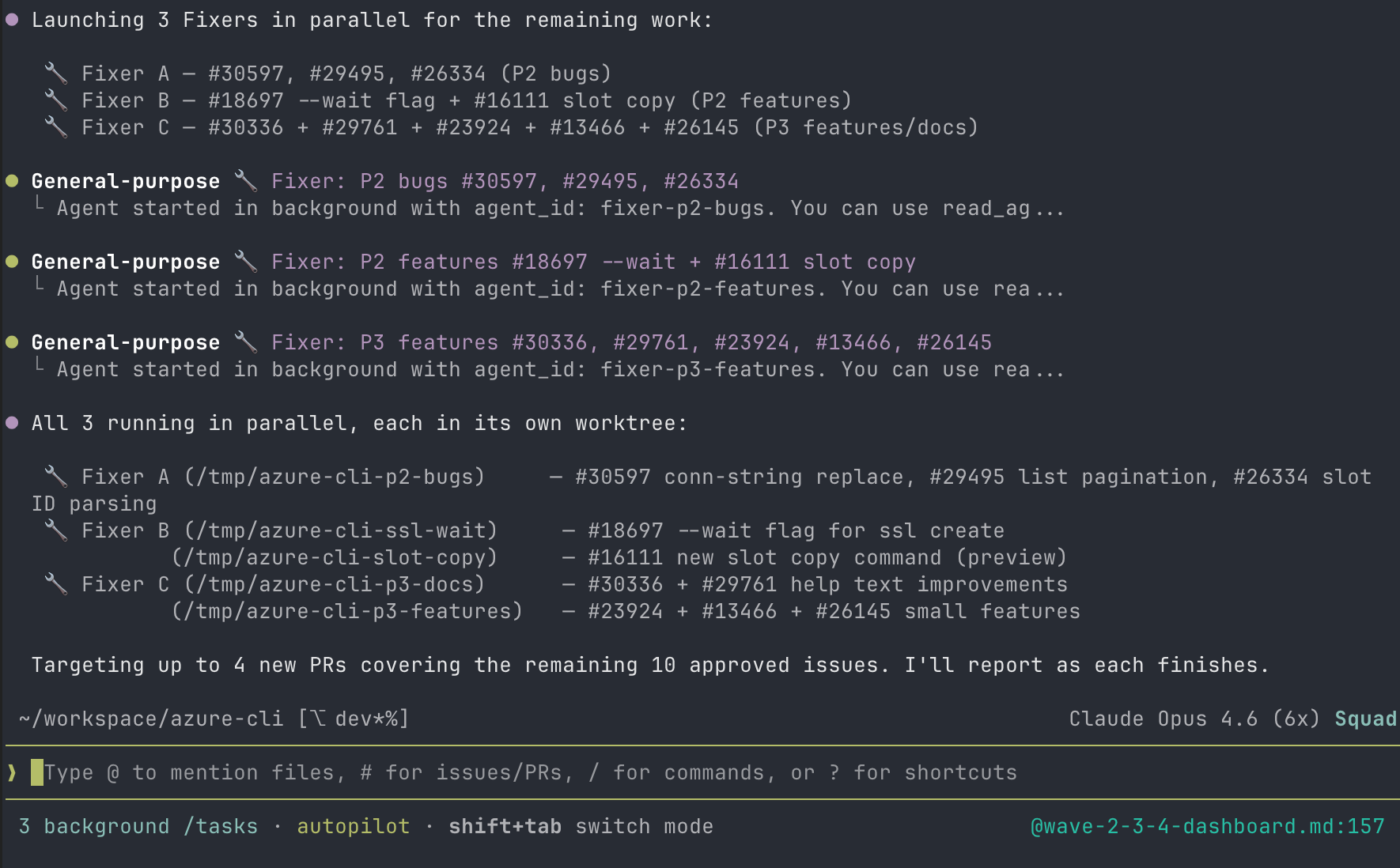 Three Fixer agents launching in parallel, each targeting a different issue cluster.
Git worktrees were absolutely critical for this. Without them, you’d have agents stepping on each other’s changes constantly. Each worktree is an isolated working copy on its own branch, so parallel work just… works.
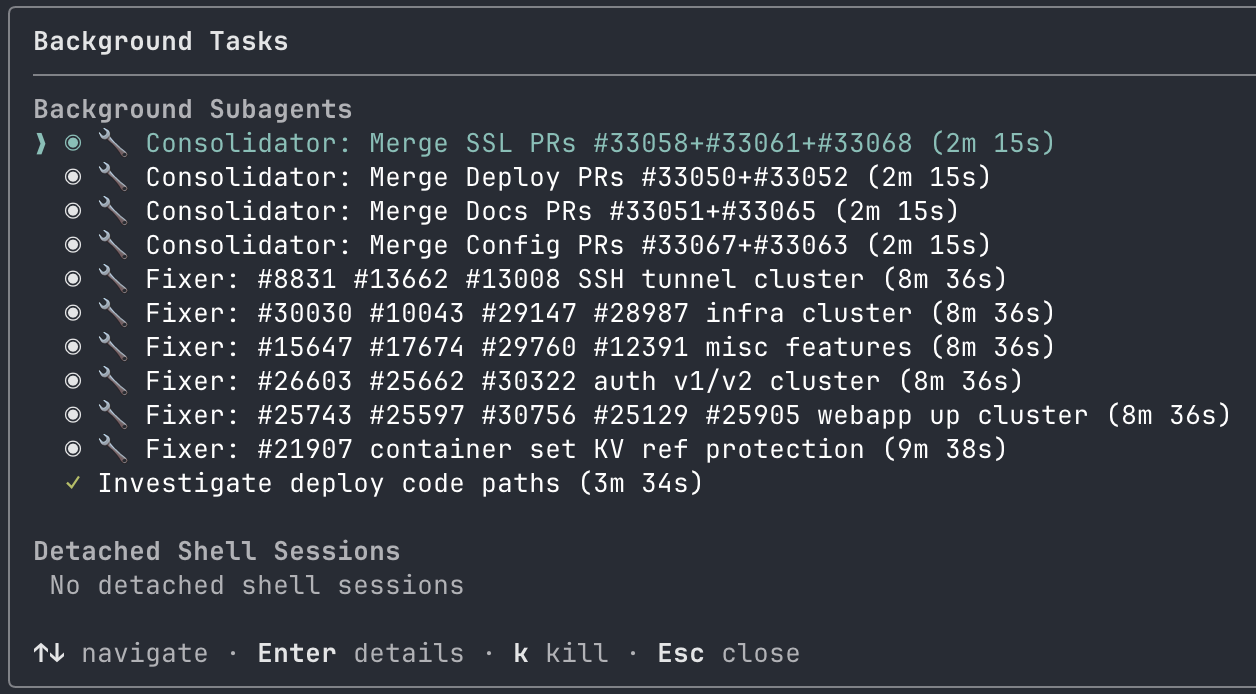 The
The /tasks panel showing consolidators and fixers running simultaneously. At peak, we had 10+ agents working in parallel.
5. PR Consolidation
Initially, we had 19 separate PRs — basically one per issue. That would have been a nightmare for our reviewers. So we consolidated them down to 8 thematically grouped PRs: an SSL cluster, an auth cluster, a container fixes cluster, and so on.
This was a deliberate choice. PRs that touch related code are easier to review together, and it reduces the cognitive load on the people who have to approve them. Reviewer fatigue is real, and dumping 19 PRs on someone’s desk is a great way to get none of them reviewed.
6. Live Validation
This is the part I want to emphasize the most: mock tests alone are not enough.
And here’s the thing — I didn’t have to do any of the live validation manually. I pointed the Squad at my Azure subscription and said “validate these fixes against real infrastructure.” The Reproducer agent took it from there. It provisioned real test resources — App Service plans, web apps, an ACR registry with a container image, Key Vault references, staging slots — ran azdev test --live against them, executed the actual CLI commands that customers had reported as broken, and then executed the fixed versions, and reported the results back to me. All I did was review the output.
This caught issues that unit tests never would have found. SSL binding edge cases that only show up with real certificates. Container deployment failures that only manifest with actual ACR images. Auth flows that depend on real Entra ID configurations. The ACR Key Vault reference bug, for example — the Reproducer deployed a real container app with KV-referenced credentials, confirmed the bug existed on the dev branch (credentials were being silently overwritten), then confirmed the fix on our PR branch preserved them correctly.
We added 80+ new unit tests across the fixes, but the live validation against real Azure resources — all orchestrated by the Squad without me having to touch a single az command — is what gave me confidence these fixes actually work.
7. CI & Review
Every PR went through the azure-cli CI pipeline. We fixed all CI failures, addressed 25 code review threads from Copilot’s automated review, and resolved every conversation. All 8 PRs are now open and waiting on the CLI maintainers to review.
Squad did the hard part — triaging 78 issues, writing the fixes, adding tests, validating against real infrastructure, and consolidating everything into clean, reviewable PRs. Now we wait. And when the maintainers come back with feedback or requested changes? Squad will handle those too.
The Numbers
Here’s the final scorecard:
| Metric | Value |
|---|---|
| Total issues triaged | 78 |
| Issues spanning | 2018–2025 |
| Triage waves | 7 |
| Issues addressed with code changes | ~46 |
| PRs (after consolidation) | 8 |
| New unit tests | 80+ |
| Code review threads resolved | 25 |
| Time to complete | ~1 working day |
One day. Years of backlog. One PM and six AI agents.
What I Learned
AI agents with human oversight can tackle years of backlog in a day. This isn’t hype — it’s what actually happened. But the “with human oversight” part is load-bearing. Without it, we would have posted wrong dispositions on customer issues and shipped broken fixes.
The human-in-the-loop pattern is essential, not optional. I caught multiple incorrect dispositions during triage. The agents are good, but they’re not infallible. A PM who knows the product domain needs to be reviewing every recommendation. This isn’t about trust — it’s about quality.
Live validation against real Azure resources is non-negotiable. If I’d only run unit tests, I would have shipped fixes that didn’t actually fix anything. Real infrastructure surfaces real bugs. Period.
Git worktrees are the secret weapon for parallel agent work. Without worktrees, parallel agents would be constantly stepping on each other. With them, each agent gets a clean, isolated workspace. If you’re running multi-agent workflows, learn worktrees.
PR consolidation reduces reviewer fatigue. Don’t dump 19 PRs on your reviewers. Group related changes together. Your team will thank you.
Transparency matters. Every AI-generated comment on every issue carried the 🤖 This comment was generated with AI assistance banner. Customers deserve to know.
The Gotcha: Squad Deleted Itself (Twice)
I want to be honest about the rough edges too. We hit a real problem that cost us time and will likely hit other Squad users. Squad is still a young project, and this is exactly the kind of real-world edge case that only shows up when more people push it into different workflows.
Since we were working in the Azure/azure-cli repo — which we don’t own — we couldn’t commit the .squad/ directory. It had to be gitignored. That means all of Squad’s state (dashboards, agent history, decisions, logs) existed only as untracked files in the working directory.
The problem: when one of our agents ran git checkout fix/ssl-branch in the main worktree instead of using git worktree add, git silently wiped every untracked file. All of our .squad/ state — the triage dashboards for all 78 issues, agent history, decisions log, orchestration records — gone. And this happened twice before we fully understood the pattern and put guardrails in place.
We added a WORKTREE_WARNING.md file to .squad/ and a hard rule in decisions.md: never run git checkout in the main worktree. We also filed bradygaster/squad#643 with four suggested improvements:
- Detect gitignored
.squad/at init — warn the user that state won’t survive branch switches - Enforce worktree usage — prevent agents from running
git checkoutwhen.squad/is untracked - Support an external state directory — store
.squad/outside the repo for contributor scenarios - Auto-backup before risky git ops — snapshot state before any branch switch
In my opinion, this is a gap in Squad’s current design for the “contributor in someone else’s repo” use case. But I also think this is ultimately a good thing: the more people use Squad in real scenarios, the better it gets. Brady and the team are actively looking for feedback, building new features, and fixing bugs, and this was exactly the kind of issue worth surfacing. If you’re using Squad in a repo you don’t own, be very careful with git operations for now. Use worktrees for everything.
What’s Next
If you’re an Azure CLI user for App Service and your issue recently got triaged or has a PR up — that’s Squad at work. And if your issue is still open, we haven’t forgotten about you. This was the first pass, and there’s more to come.
Right now we’re waiting on the CLI maintainers to review the 8 PRs. Once they do, Squad is ready to jump back in and address whatever feedback comes up. The agents aren’t a one-and-done thing — they’re standing by for the review cycle too.
If you’re a PM or engineer sitting on a big backlog, I’d encourage you to check out Squad. The multi-agent approach — with proper human oversight — is a genuine force multiplier. It’s not about replacing engineers. It’s about giving a team member, such as a PM, the ability to contribute at a scale that wasn’t possible before.
I went from one PR every couple months to 8 PRs in a day. That’s the kind of leverage that changes how you think about backlogs.
Thanks to Brady Gaster for building Squad and for the support along the way. And thanks to everyone who filed issues on the Azure CLI — your feedback is what drives these improvements, even when it takes us longer than we’d like to get to them.
Comments